
How Does a Turntable Work? A Complete Guide
A turntable turns movement in a record groove into a signal you can hear. Follow that signal from the stylus to the speakers, then see how drive systems, cartridges and output connections shape a playback setup.
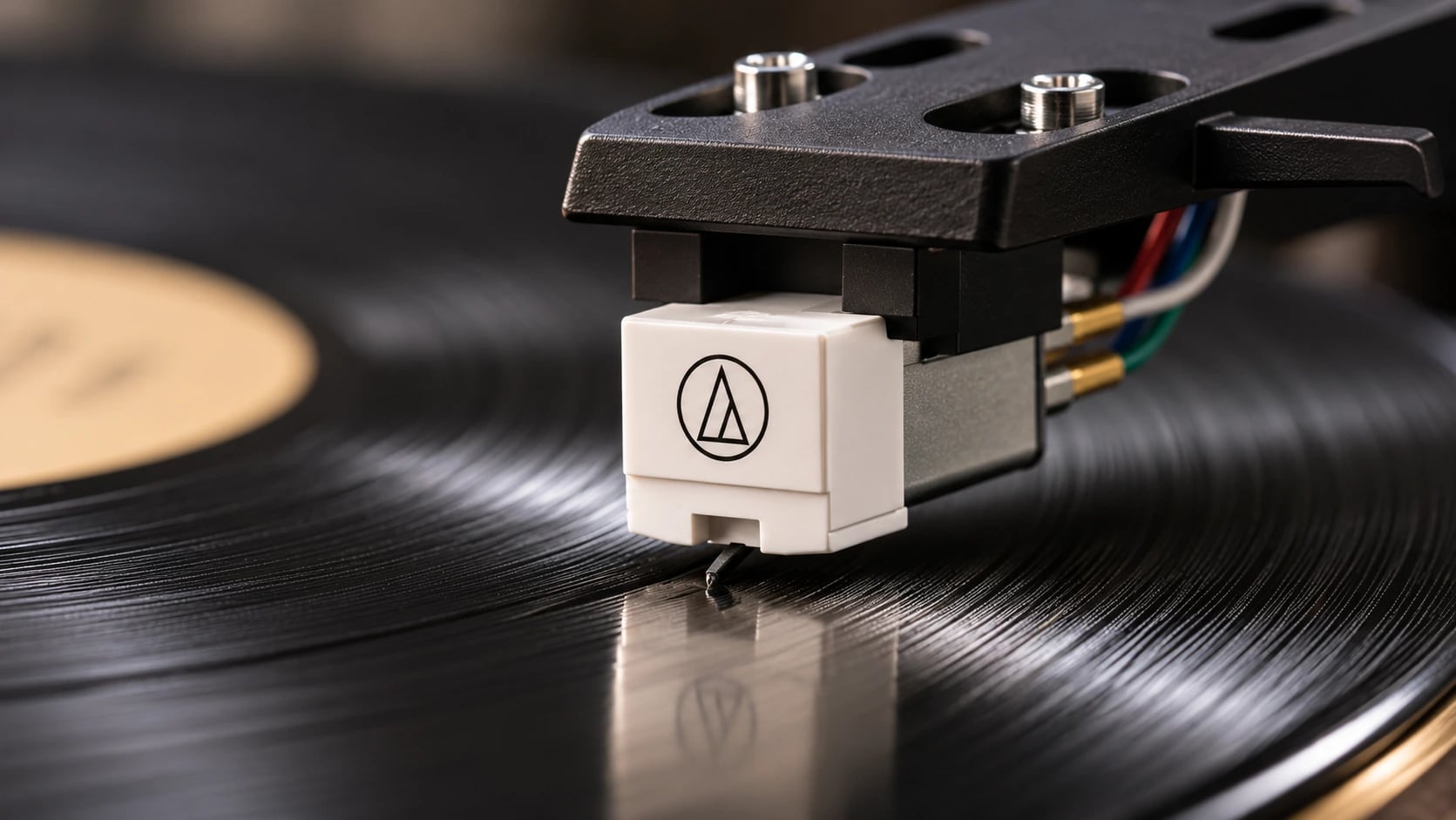
Key Takeaways
- A turntable converts mechanical movement from a record groove into an electrical audio signal.
- The stylus follows the groove, the tonearm supports the cartridge, and the cartridge converts stylus motion into a signal.
- Belt-drive systems transmit motor torque through a belt. Direct-drive systems use a coaxial motor to turn the platter.
- Moving-magnet cartridges use electromagnetic induction. Ceramic cartridges use the piezoelectric effect and require suitable electrical loading.
- In a typical moving-magnet system, PHONO OUT feeds a compatible phono stage. LINE OUT supplies a signal that already has phono gain and playback equalisation.
- Accurate platter speed, a stable support and the cartridge maker’s specified tracking force help maintain consistent playback.
How a turntable produces sound
A turntable converts the shape of a moving record groove into an electrical audio signal. The motor turns the platter, the stylus follows the groove, and the cartridge converts the resulting motion into voltage. In a moving-magnet system, a phono preamplifier supplies gain and playback equalisation before the amplifier and speakers reproduce the sound.
The process begins with a motor that rotates the platter at a selected speed, typically 33⅓ or 45 RPM. As the stylus travels through the record groove, microscopic variations in the groove cause the stylus and cantilever to vibrate.
In a moving-magnet (MM) cartridge, these vibrations move a small magnet relative to stationary coils, generating a low-level electrical signal through electromagnetic induction. This signal is typically only a few millivolts.
The phono preamplifier amplifies the signal to line level and applies RIAA equalization to restore the intended frequency balance of the recording. A power amplifier then provides sufficient power to drive the speakers, whose diaphragms vibrate to produce audible sound waves.
Depending on the turntable's design, these components may be housed separately or integrated into an all-in-one record player with built-in speakers.
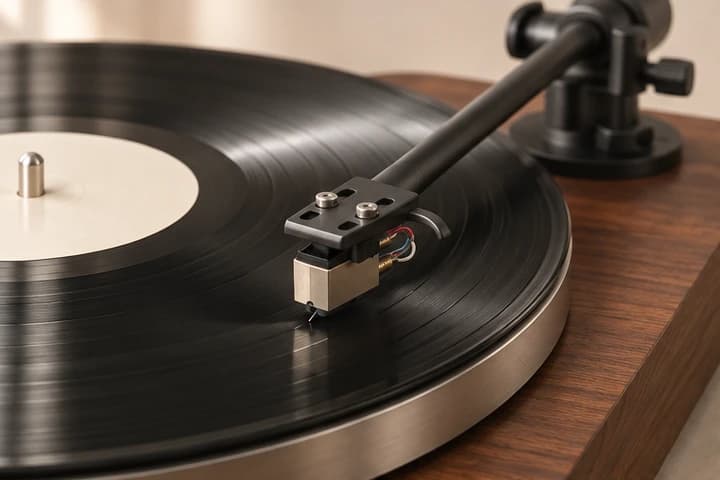 Record, stylus & cartridge
The groove moves the stylus and cantilever. The cartridge turns that motion into an electrical signal.
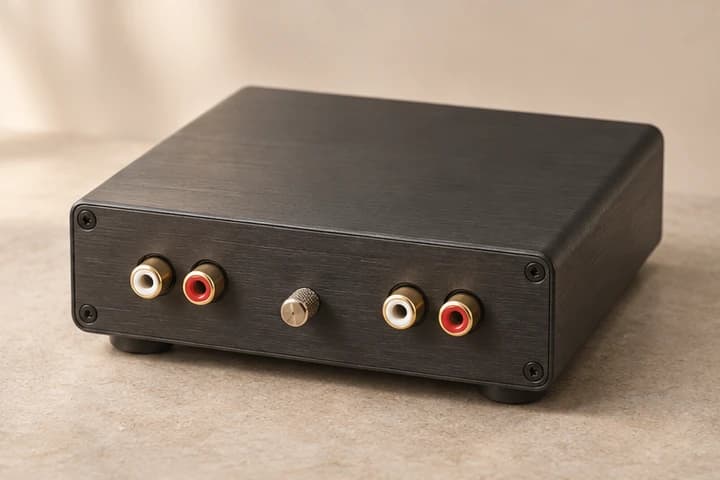 Phono preamp
Equalizes the cartridge signal and raises it to line level.
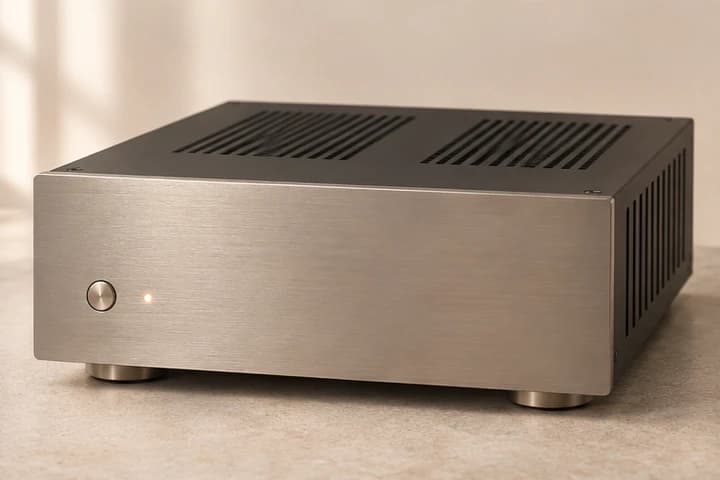 Power amplifier
Supplies the power needed to drive the speakers.
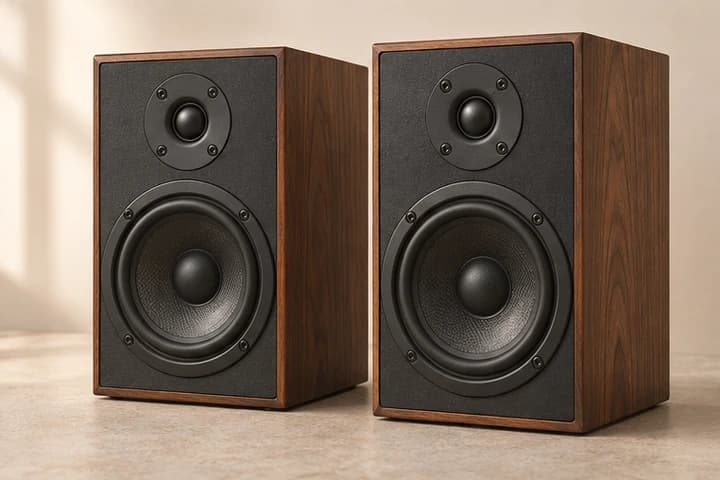 Speakers
The speaker diaphragms move air to produce sound.
The Main Parts of a Turntable
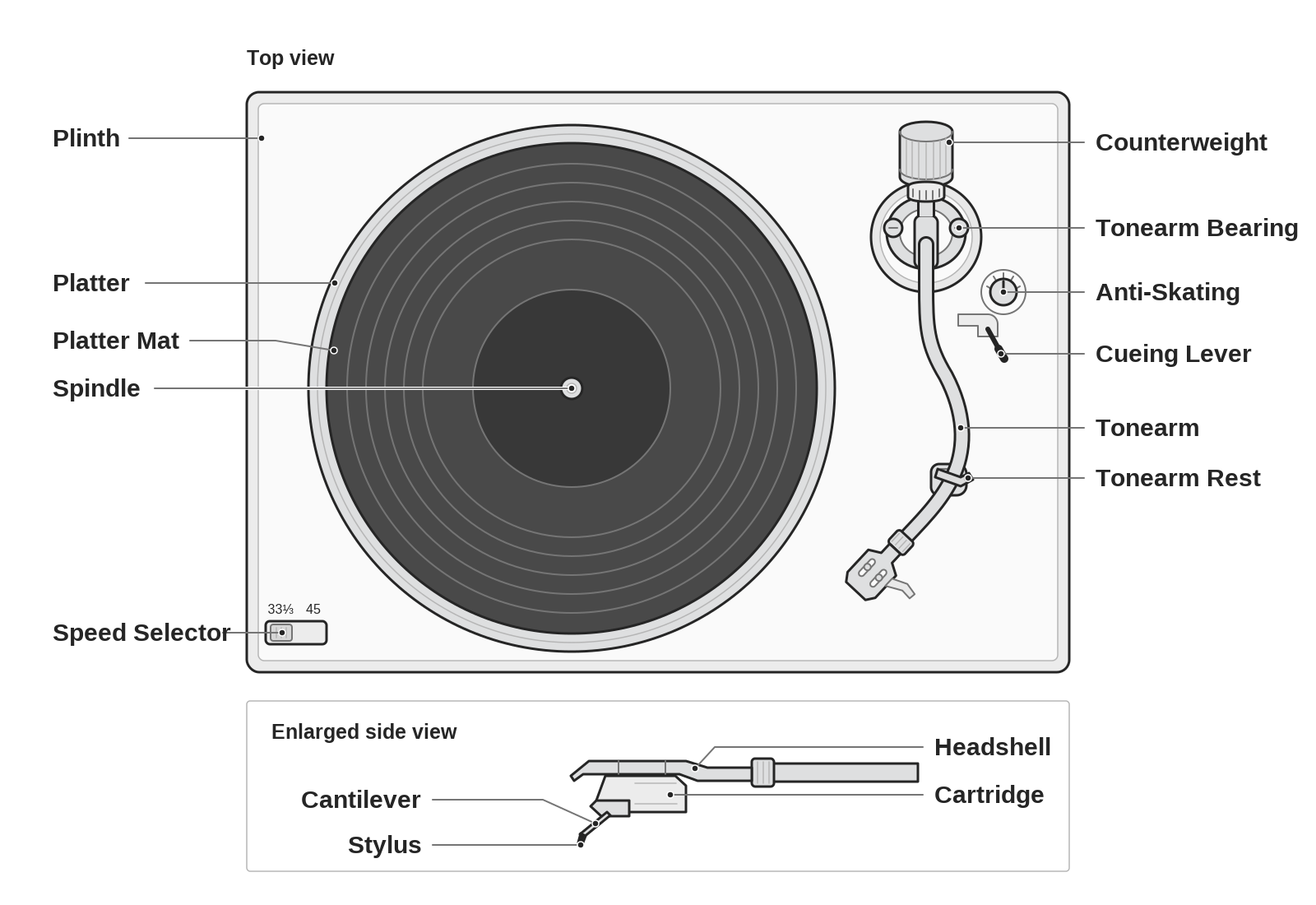
A turntable has three main assemblies. The plinth supports the mechanism, the motor and bearing keep the platter rotating, and the tonearm carries the cartridge and stylus. The spindle centres the record. Together these parts control how steadily the groove passes the stylus and how accurately the stylus follows it.
Plinth
The plinth forms the structural base of the turntable. It supports the mechanical components and, depending on its construction, helps reduce unwanted vibrations during playback.
Platter and Spindle
The platter supports the vinyl record and provides a stable rotating surface. The spindle keeps the record centered as the platter rotates. A platter mat, when fitted, provides an interface between the record and the platter.
Motor and Drive System
The motor rotates the platter at a selected speed, typically 33⅓ or 45 RPM. Some turntables also support 78 RPM.
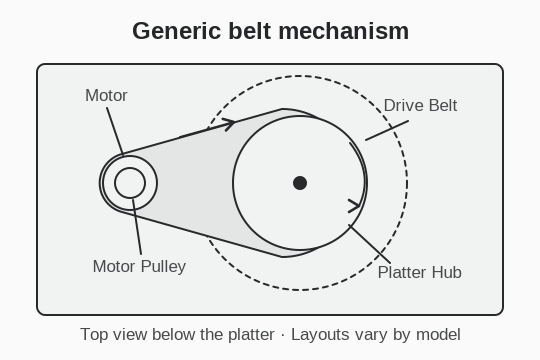
In a belt-drive turntable, a rubber belt transfers rotation from the motor pulley to the platter or subplatter. In a direct-drive turntable, the motor drives the platter directly.
Tonearm
The tonearm supports the cartridge and guides the stylus across the record. Its geometry, bearings, and mechanical stability influence tracking accuracy.
Cartridge and Stylus
The stylus follows the microscopic variations in the record groove. These vibrations are transferred through the cantilever to the cartridge, which converts mechanical movement into an electrical audio signal.
Counterweight and Anti-Skating
On turntables equipped with an adjustable counterweight, the counterweight balances the tonearm and allows the tracking force to be adjusted.
An anti-skating mechanism, where fitted, helps compensate for the inward skating force acting on a pivoted tonearm during playback.
Cueing Lever and Tonearm Rest
The cueing lever allows the tonearm to be raised and lowered in a controlled manner. The tonearm rest supports the tonearm when the turntable is not in use.
Speed Selector
The speed selector allows the user to choose the appropriate rotational speed for the record being played.
How a stylus follows the groove
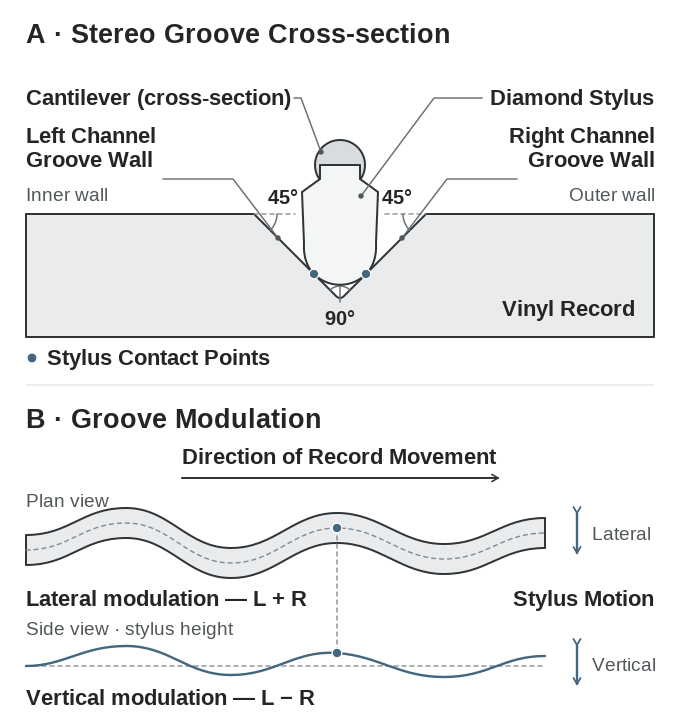
The stylus tip sits between the two walls of a spiral record groove. As the record rotates, microscopic groove modulations cause the stylus to move. These movements are transmitted through the cantilever to the cartridge, where mechanical motion is converted into an electrical audio signal.
In a stereo record, the two groove walls are oriented at 45 degrees to the record surface, with each wall carrying information for one audio channel.
Stylus profile, tracking force, cartridge alignment, anti-skating and groove condition all influence how accurately the stylus follows the recorded signal. Proper setup helps minimise distortion, mistracking and unnecessary record wear.
Measuring stylus tracking force
Balance an adjustable tonearm if its manual calls for it. Zero the gauge, then lower the stylus onto the measuring platform as close to record playing height as the gauge permits. Compare the result with the specification for the fitted cartridge and stylus. A force reading checks the static load. Assess tracking performance separately with a defined groove modulation and a criterion for mistracking.
Pro-Ject Audio Systems [21] · Audio-Technica [1] · Ortofon [20]
Belt drive vs. direct drive
A belt-drive turntable uses a belt to carry torque from an offset motor to the platter or subplatter. In a direct-drive turntable, the motor shares the platter’s axis and drives it directly. Speed stability depends on the complete mechanism, including motor control, bearing quality and how torque is transferred to the platter.
Drive System Overview
Both designs need stable mean speed and smooth torque delivery. The drive mechanism determines how motor vibration and torque variation reach the platter.
Belt-drive Turntables
A compliant belt provides some mechanical isolation between the motor and platter. Motor vibration can still reach the platter or tonearm through the belt, motor mounts and plinth. Belt tension, pulley and subplatter concentricity, and the condition of the belt all affect how smoothly torque is transmitted. Ageing or slipping belts can affect speed stability and eventually need replacement.
Platter inertia helps smooth short-term changes in torque. A platter with higher inertia also needs more torque, or more time, to reach speed. Belt drive is common in domestic Hi-Fi, where designers can combine a compliant belt with an isolated motor mount and a dedicated platter bearing.
Direct-drive Turntables
The motor stator is fixed and the rotor turns with the platter around the main spindle and bearing. Direct coupling allows designs with high start-up torque and short run-up times, which can be useful for repeated cueing in DJ and broadcast work. Direct drive is also used in domestic Hi-Fi.
Torque ripple is a variation in the torque produced by the motor as it rotates. In a directly coupled system, these variations can reach the platter. Motor design, speed sensing and control, platter inertia and bearing quality all influence the resulting speed fluctuations and mechanical vibration.
Performance Comparison
Speed accuracy describes how closely the average platter speed matches the selected speed. Wow and flutter are slower and faster variations around that speed. Compare published measurements only when the test method and weighting are comparable. Speed stability, wow and flutter, and mechanical noise depend on the complete design, including motor control, platter inertia, bearing quality, vibration isolation and manufacturing precision.

| Criterion | Belt drive | Direct drive |
|---|---|---|
| Drive Mechanism | An offset motor and pulley drive the platter or subplatter through a belt. | A coaxial motor rotor drives the platter directly. |
| Motor Isolation | The flexible belt can attenuate some vibration. Mounts and the plinth also matter. | Vibration depends on the motor, its mounting, the bearing and the plinth. |
| Speed Stability | Depends on motor control, belt condition, pulley concentricity and platter inertia. | Depends on motor control, speed sensing, bearing quality and platter inertia. |
| Startup Torque | Torque at the platter depends on the motor, pulley ratio and grip of the belt. | Motor torque acts directly on the platter. Available torque varies by design. |
| Startup Time | Depends on transmitted torque and platter inertia. | Can be short with sufficient motor torque. Platter inertia still matters. |
| Wow & Flutter | Belt condition and pulley eccentricity can affect the measured result. | Torque ripple and speed control can affect the measured result. |
| Maintenance | Inspect and replace the belt as needed. Follow the manufacturer’s bearing guidance. | Follow the manufacturer’s service guidance for the bearing and drive system. |
| Typical Applications | Domestic Hi-Fi and general listening. | Domestic Hi-Fi, DJ use and broadcast playback. |
Turntable mechanical engineering
Inspect the motor mounts, platter bearing and chassis as one mechanical assembly. On a belt-driven design, check that the belt tracks in the intended plane and that the pulley runs concentrically. Record the assembly revision, since changes to motor mounts or bearing alignment can alter how vibration reaches the platter and cartridge.
Turntable playback speeds
The speed printed on a record tells you how fast the platter should turn. Playing at the wrong speed changes both pitch and duration. Common settings are 33⅓, 45 and 78 revolutions per minute (RPM). For historical discs, check the intended playback speed and groove type before selecting the stylus.
Turntable Playback Speed Overview
Turntable speed is measured in revolutions per minute (RPM), the number of complete turns the record makes in one minute. Use the speed marked on the label or sleeve. Linear groove velocity is the tangential speed of the groove past the stylus. At a fixed RPM it falls as the stylus moves towards the centre, where each revolution covers a shorter distance.
For a given audio frequency, higher linear velocity spreads each cycle over more groove length. This can make short-wavelength high-frequency modulations easier for the stylus to trace, especially in the inner grooves. Mastering, pressing quality, groove radius and cartridge set-up all influence the result.
v = 2πrN / 60
- v
- Linear groove velocity (m/s)
- r
- Groove radius (m)
- N
- Rotational speed (RPM)
At a groove radius of 100 mm
- 33⅓ RPM
- ≈ 34.9 cm/s
- 45 RPM
- ≈ 47.1 cm/s
- 78 RPM
- ≈ 81.7 cm/s
At the same radius, 45 RPM gives 35% higher linear groove velocity than 33⅓ RPM.
These are theoretical values. The 45 RPM example assumes a disc with a groove at 100 mm, such as a 12-inch pressing.
33⅓ RPM
The 12-inch vinyl LP uses closely spaced microgrooves to fit album-length programmes across two sides. Smaller 33⅓ RPM releases also exist. Use a compatible microgroove stylus and the tracking force specified by the cartridge maker.
45 RPM
The 7-inch vinyl single is a familiar 45 RPM format. Both small-hole and large-hole editions exist. For a large centre hole, use a suitable spindle or adaptor. Some 12-inch singles, EPs and albums also play at 45 RPM. Use a compatible microgroove stylus suited to the pressing.
78 RPM
Many historical commercial 78s are shellac records with a wider, coarse groove. Ten-inch discs are common, alongside 12-inch and other sizes. Some 78 RPM pressings use other materials, including vinyl. A 78 RPM setting covers platter speed only. Check the individual record’s intended speed, groove geometry and stylus requirements, particularly for early pressings. A spherical tip with a 65 µm radius is one example of a dedicated coarse-groove stylus. Choose the tip that fits the groove and the cartridge.
Speed Accuracy and Rotational Stability
Speed accuracy compares mean platter speed with the selected value. A steady overspeed raises pitch and shortens playback time. A steady underspeed lowers pitch and lengthens it. Wow and flutter describe slower and faster short-term speed variations respectively, which can modulate pitch even when the average speed is correct.
Motor control regulates speed and can correct deviations where feedback is used. The drive transfers torque, so belt slip or motor torque ripple can disturb rotation. Platter inertia smooths brief changes in torque and affects run-up time. Bearing friction and alignment affect how evenly the platter turns. Compare wow and flutter figures measured at the same speed with comparable test methods and weighting.

| Playback Speed | 33⅓ RPM | 45 RPM | 78 RPM |
|---|---|---|---|
| Typical Diameter | 12 inches | 7 inches | 10 inches |
| Typical Material | Vinyl | Vinyl | Shellac compound |
| Typical Playing Time per Side | About 20–23 min | About 4–5 min | About 3 min |
| Groove Type | Microgroove | Microgroove | Coarse groove |
| Typical Stylus | Microgroove stylus | Microgroove stylus | Coarse-groove stylus |
| Common Applications | LP albums | Singles and EPs | Historical recordings |
- Record dimensions, materials and groove types. Library of Congress record format guide.
- Typical side lengths. Library of Congress LP history, American Vinyl Co pressing guidance and Library of Congress historical 78 RPM example.
- Historical speed and stylus selection. Library of Congress analogue transfer guidance.
- Coarse-groove stylus example. Ortofon 65 µm stylus specification.
- Tracing high frequencies. SST record-cutting guidance.
Measuring turntable speed stability
Measure mean platter speed after it has settled. To measure wow and flutter, play a suitable reference track and analyse how its frequency varies over time. Record the test disc, track, playback speed, measurement window, instrument, weighting and detector. An off-centre test pressing can add a once-per-revolution variation. Compare results obtained under matching conditions, including how the instrument reports the result.
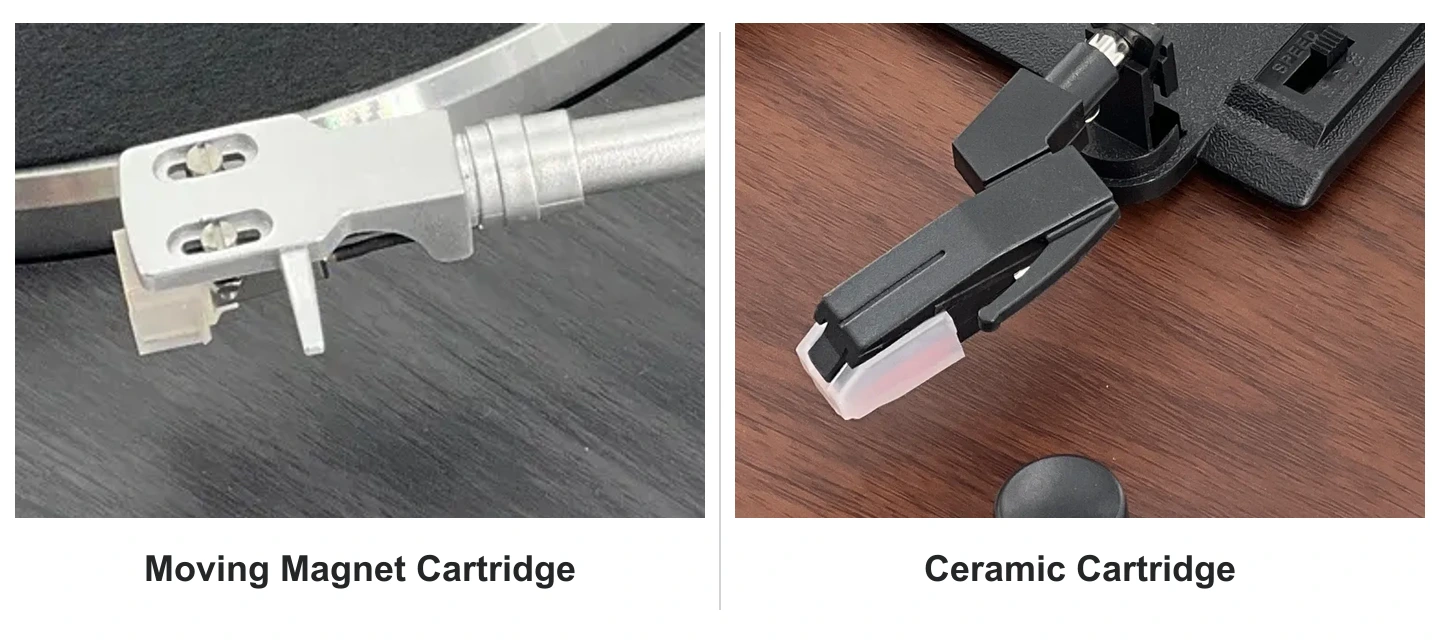
Moving magnet vs. ceramic cartridges
Moving-magnet and ceramic cartridges both convert stylus motion into an electrical signal. Moving-magnet cartridges induce a voltage in coils as a magnet moves. Ceramic cartridges generate charge when the stylus stresses a piezoelectric element. Their different output and loading characteristics determine which input circuit will preserve the intended frequency response.
Cartridge Operating Principles
A phono cartridge converts the mechanical movement of the stylus and cantilever into an electrical audio signal. Moving magnet and ceramic describe the transducer. Diamond, sapphire and ruby describe stylus tip materials. A ceramic cartridge can also use a diamond stylus when the stylus assembly is compatible.
Moving-magnet (MM) Cartridges
As the groove moves the cantilever, a small magnet moves relative to fixed coils. The change in magnetic flux induces an alternating voltage in the coils. A compatible MM phono preamplifier provides gain for this millivolt-level signal and applies RIAA playback equalisation to reverse the frequency shaping used when cutting the record.
Cartridge loading includes the input resistance and the total capacitance of the tonearm wiring, interconnect and phono input. Together with coil inductance, these affect high-frequency response. Follow the cartridge maker’s loading and tracking-force specifications. Compare published channel separation and frequency response under equivalent test conditions.
Ceramic Cartridges
A mechanical coupling transfers cantilever motion to a piezoelectric element. Mechanical stress in the ceramic generates electrical charge, which produces a voltage across its electrodes. The output is often higher than that of an MM cartridge and depends on the element, groove signal and electrical loading.
The element presents a largely capacitive source impedance. A suitably high-impedance input and matched compensation preserve the intended frequency response. An ordinary line input can load the element excessively and reduce bass output. Integrated record players can incorporate a buffer and compensation designed for the fitted cartridge. The coupling and mechanical compliance also shape the response.
Cartridge Selection and Playback Performance
Assess the cartridge and playback system together. Stylus profile, cantilever construction, stylus compliance, tracking force, tonearm matching and circuit design all influence playback. Check that the stylus assembly fits the cartridge and the tonearm can operate within the specified tracking-force range. Frequency response and channel separation describe the performance of a specific cartridge under its stated test conditions.
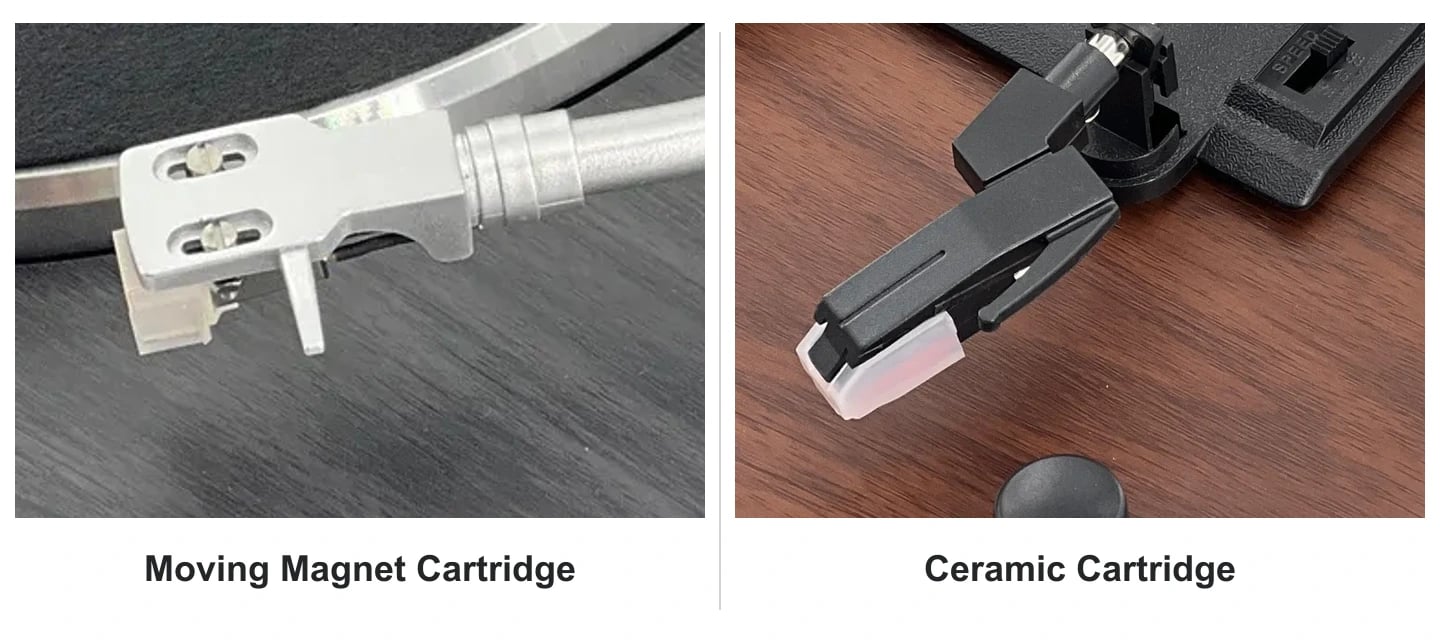

| Criterion | Moving magnet | Ceramic |
|---|---|---|
| Operating Principle | A moving magnet varies the flux through fixed coils. | A stressed piezoelectric element generates charge. |
| Output Voltage | Manufacturer examples at 1 kHz and 5 cm/s: AT3600L 3.5 mV (TEAC TN-280BT) and AT-VM95E BK 4.0 mV (Audio-Technica AT-LPW50BT). | Often higher than MM. Check the specified load, test frequency and groove modulation. |
| Input Impedance | 47 kΩ is common. Match total capacitance to the cartridge specification. | Use the specified high-impedance input and compensation network. |
| Signal Amplification | An MM phono stage supplies low-noise gain. | A matched buffer or preamplifier conditions the output. |
| RIAA Equalisation | A compatible phono stage applies the RIAA playback curve. | The playback response depends on the cartridge’s mechanical response and matched electrical compensation. |
| Frequency Response | Depends on the stylus assembly, generator and electrical loading. | Depends on the stylus assembly, coupling, loading and compensation. |
| Channel Separation | Check the manufacturer’s rating at the stated frequency. | Check the stereo cartridge’s rating at the stated frequency and load. |
| Tracking Force | Manufacturer examples: AT-VM95E BK 1.8–2.2 g and the ATN3600L replacement stylus 3.0–4.0 g. | Use the range specified for the fitted cartridge and stylus. |
| Stylus Material | A diamond tip is common. Check the specified replacement stylus. | Diamond, sapphire or ruby options depend on the design. |
| System Cost | Include the stylus and a compatible phono stage, built in or external. | Include the stylus and matched input circuitry, often built in. |
| Typical Applications | Component Hi-Fi decks and turntables with an integrated MM stage. | Integrated record players and systems with a matched ceramic input. |
Numerical values are manufacturer reference examples. Compare output figures only at matching test frequencies, groove velocities and electrical loads.
TEAC [2] · Audio-Technica [1] · Audio-Technica [3] · U.S. Patent Office [4] · Texas Instruments [5]
PHONO OUT vs. LINE OUT
In a moving-magnet system, PHONO OUT carries the low-level cartridge signal to a compatible phono stage. LINE OUT carries audio after the turntable’s built-in phono stage has added gain and applied RIAA playback equalisation. Connect PHONO OUT to a suitable PHONO input and LINE OUT to an AUX or LINE input.
PHONO OUT
PHONO OUT carries the low-level cartridge signal. A typical MM cartridge produces a signal of a few millivolts under its specified test conditions. Connect this output to a compatible MM PHONO input or an external phono preamp. The phono stage amplifies the signal and applies playback equalisation before feeding a line input.
LINE OUT
A turntable’s LINE OUT supplies a line-level signal after gain and RIAA playback equalisation in its built-in phono stage. Connect it to an AUX or LINE input on an amplifier or powered speakers. Passive speakers require a suitable power amplifier.
The PHONO/LINE Switch
On a typical switchable turntable, PHONO bypasses the built-in phono stage and LINE enables it. The photographed DN-TT003 has a PHONO/LINE selector and a shared stereo RCA output. Consult the instructions or circuit documentation for the specific unit to confirm its signal routing.
Grounding and Electrical Noise
Where the equipment instructions specify a ground lead, connect it between the turntable and the receiving phono stage’s ground terminal. A suitable ground connection can reduce electrical hum. If hum persists, check cable screening, connections and the position of nearby power supplies.
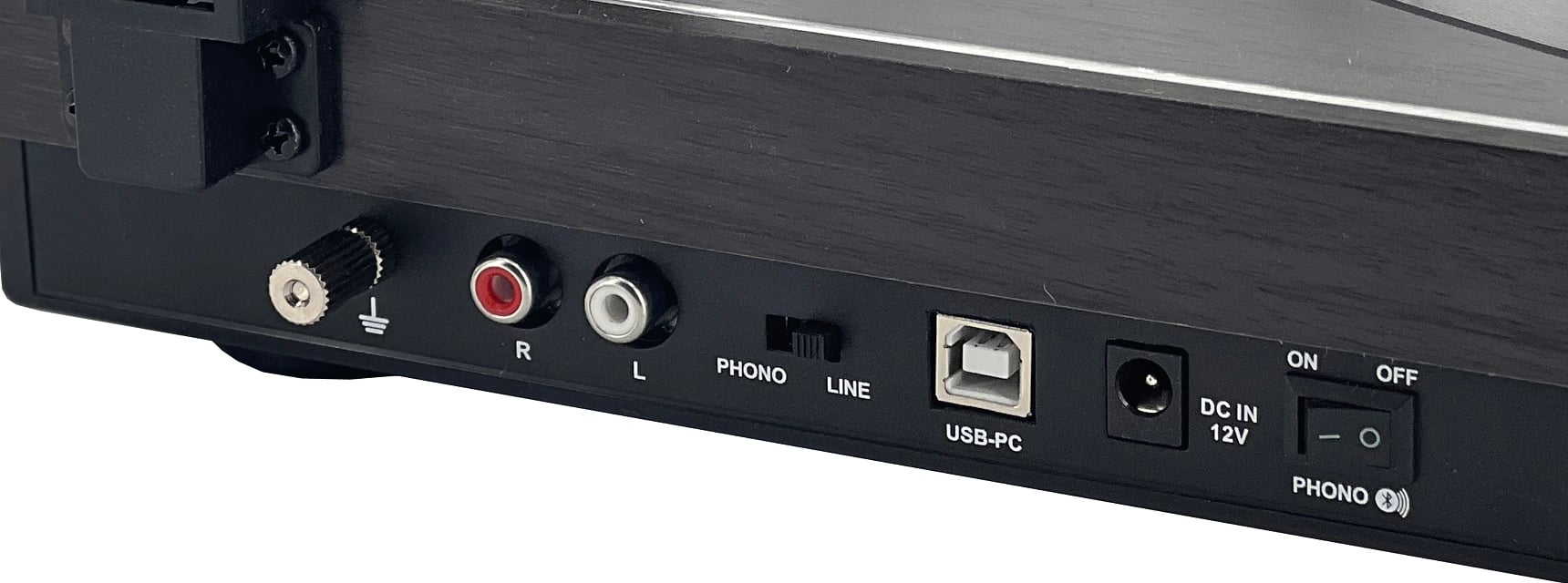
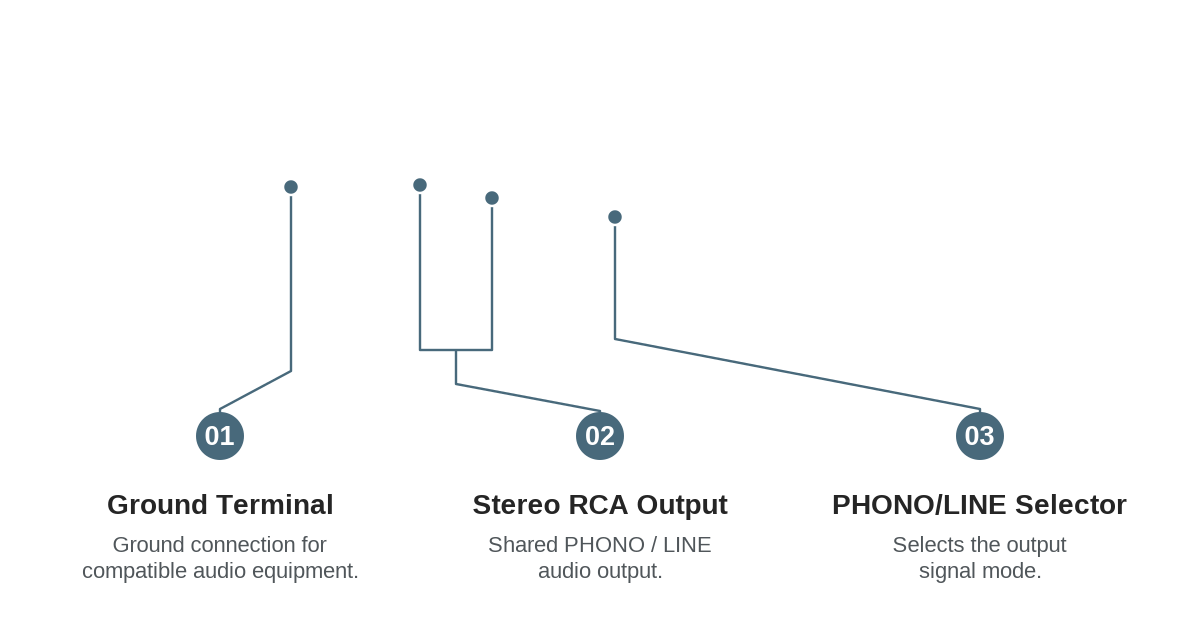
- Ground TerminalGround connection for compatible audio equipment.
- Stereo RCA OutputShared PHONO / LINE audio output.
- PHONO/LINE SelectorSelects the output signal mode.

RIAA recording and playback equalisation
Record cutting reduces bass and boosts treble relative to 1 kHz, limiting low-frequency groove excursion. The phono stage applies the inverse curve to restore the intended frequency balance and attenuate high-frequency noise from the record surface.
The theoretical curves use the RIAA time constants of 3,180, 318 and 75 μs and are normalised to 0 dB at 1 kHz. Texas Instruments application report [5]
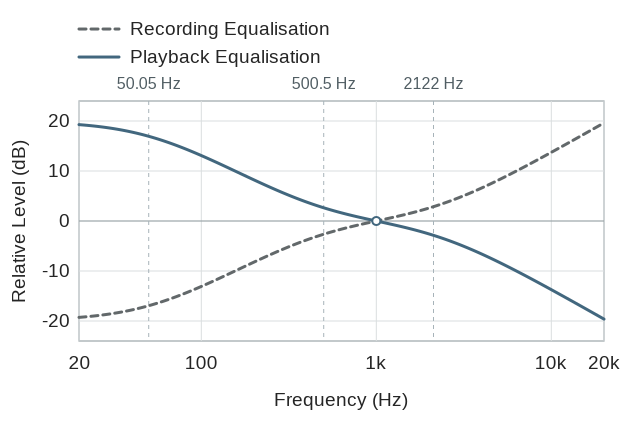
| Criterion | PHONO OUT | LINE OUT |
|---|---|---|
| Signal Type | Phono-level MM cartridge signal. | Line-level audio from the built-in stage. |
| Nominal Output (AT-LPW50BT example) | 4.0 mV at 1 kHz and 5 cm/s recorded groove velocity. | 200 mV at 1 kHz and 5 cm/s recorded groove velocity. |
| Built-in Phono Preamp | Typically bypassed. | Typically engaged. |
| RIAA Playback Equalisation | Applied by the receiving phono stage. | Already applied by the turntable’s phono stage. |
| External Phono Preamp Requirement | Use a separate phono preamp when the receiving amplifier lacks a compatible MM PHONO input. | Connect directly to a compatible line input. |
| Compatible Input | MM PHONO input on an amplifier or phono preamp. | AUX or LINE input on an amplifier or powered speakers. |
| Ground Connection | Use the designated ground terminals where the equipment instructions call for it. | Follow the equipment instructions for the selected mode. |
| Typical Application | A system with a separate or amplifier-integrated phono stage. | A system using the turntable’s built-in phono stage. |
The levels in this example are Audio-Technica manufacturer specifications for the AT-LPW50BT. They describe PHONO and LINE output under the stated test conditions. Audio-Technica AT-LPW50BT user manual [1]
| Connection | Possible effect | What to check |
|---|---|---|
| PHONO OUT to AUX IN | Very low volume, weak bass and incorrect frequency balance. | Use an MM PHONO input or a phono preamp before AUX. |
| LINE OUT to PHONO IN | Input overload, distortion and incorrect frequency balance. | Use AUX or LINE IN, or select PHONO on the turntable for a compatible MM input. |
| LINE OUT to passive speakers | The line signal needs power amplification to drive the speakers. | Connect LINE OUT to a suitable amplifier’s line input. |
| Grounding problem | Possible electrical hum. | Check the ground connection and cable routing against the equipment instructions. |
Measuring PHONO and LINE output
For a paired output-level comparison, use the same test track, cartridge and speed. Record the groove velocity, signal frequency, output mode, load, bandwidth and voltage convention. A playback test includes the cartridge and record. To measure phono preamplifier gain and RIAA accuracy separately, inject a calibrated signal at the specified input level and source impedance.
Bluetooth input vs. output
Bluetooth input (RX) lets a turntable receive audio from a phone or another compatible source for playback through its audio system. Bluetooth output (TX) sends record playback to compatible wireless speakers or headphones. Check the model’s documented Bluetooth role when planning a connection, since turntables may support either direction or both.
Bluetooth Input (RX)
In RX mode, a Bluetooth turntable acts as a wireless playback device for a smartphone, tablet or compatible computer. Its Bluetooth receiver decodes the incoming digital audio. The turntable processes the decoded signal and routes it to an amplifier for playback through built-in or connected speakers. The streamed audio comes from the paired device. Vinyl playback uses the turntable’s cartridge signal path.
Bluetooth Output (TX)
Bluetooth TX sends vinyl playback to compatible Bluetooth speakers or headphones. The cartridge produces an analogue signal, which the turntable conditions as required by the cartridge design. Analogue-to-digital conversion (ADC) then produces a digital audio stream. The Bluetooth transmitter encodes and sends that stream to the paired device, where it is decoded and played.
Bluetooth Codecs and Audio Performance
SBC is the baseline codec for Bluetooth Classic A2DP. AAC is optional, and the aptX family offers additional codec options on compatible equipment. A stream uses a format supported by both devices. Codec availability depends on the hardware, software and audio profile implemented at each end.
The Bluetooth version describes the core specification. Sound quality depends on the audio chain, the codec in use and the implementation. Encoding, buffering, transmission and decoding contribute to audio latency. Distance, obstructions and radio interference can affect connection quality.
Bluetooth Compatibility
RX-only turntables receive audio from a compatible source. TX-only turntables send audio to a compatible playback device. RX + TX models support both directions. Check the product manual for how modes are selected and whether they can operate concurrently.

| Criterion | Input (RX) | Output (TX) |
|---|---|---|
| Function | Receives a wireless audio stream. | Sends a wireless audio stream. |
| Bluetooth Audio Role | A2DP Sink | A2DP Source |
| Audio Source | Smartphone, tablet or compatible computer. | Vinyl playback through the cartridge. |
| Signal Processing | Decodes the stream, then processes audio for playback. | Conditions and digitises the cartridge signal, then encodes it. |
| Playback Destination | Built-in or connected speakers. | Compatible Bluetooth speakers or headphones. |
| Primary Application | Play audio from a paired device through the turntable system. | Listen to records wirelessly. |
| Compatible Device | A device that can send audio in a shared Bluetooth profile. | A playback device that can receive audio in a shared profile. |
| Audio Latency | Depends on the source, buffering, codec and playback chain. | Depends on the turntable, wireless link, codec and receiver. |
Setting up a turntable
Check the manual before starting your turntable setup. Factory-adjusted models typically have a pre-aligned cartridge and fixed or preset tracking force, and may have no separate anti-skating control. Leave factory settings and assemblies in place unless the manual calls for an adjustment. Adjustable Hi-Fi models generally use a counterweight to set tracking force. Depending on the arm, they may also allow cartridge alignment and anti-skating adjustment.
Position and Level the Turntable
Place the turntable on a rigid, stable support away from sources of vibration. Keep separate loudspeakers off the same support where possible. Mechanical vibration from footfalls and acoustic feedback from the speakers can reach the stylus. With the platter stationary, place a spirit level on it and check left to right and front to back. Adjust the feet or support as the manual permits, then recheck both directions.
Install the Platter and Drive Belt
For a belt-drive deck that requires assembly, disconnect power and follow the model’s drive belt installation instructions. Seat the platter or subplatter on the spindle as directed and route the belt around the motor pulley and the specified drive surface. Check that the belt lies flat without twists and runs clear of surrounding parts as you turn the platter gently by hand. Leave a factory-fitted belt in place unless the manual directs you to inspect it.
Check Cartridge Alignment
If you fit or move an adjustable cartridge, use the alignment protractor specified for the tonearm. Overhang is how far the stylus extends beyond the spindle centre when the arm is brought over it. Offset angle is the angle between the cartridge axis and the line from the arm pivot to the stylus. Together they affect tracking-angle error across the record and the distortion it can produce. Follow the protractor’s reference points. Azimuth (side-to-side tilt) and vertical tracking angle (VTA) are advanced adjustments for arms that support them.
Balance the Tonearm and Set Tracking Force
On a counterweighted arm that requires balancing, follow the manual to float the arm and zero the tracking-force scale if fitted. Keep the stylus clear of the platter while balancing. Set vertical tracking force (VTF) within the cartridge manufacturer’s recommended range. Verify it with a zeroed digital stylus force gauge, with its measuring surface as close as practical to record playing height. Too little force can cause mistracking. Excessive force can increase stylus and record wear.
Adjust Anti-Skating
Groove friction tends to pull a pivoted arm inwards. Where fitted, anti-skating applies an outward bias. Start with the arm manufacturer’s procedure after setting tracking force. The required compensation depends on the arm design, tracking force, stylus profile and groove conditions.
Connect the Audio System
Match PHONO OUT to a compatible phono stage and LINE OUT to a line input. Use the ground terminal when the equipment instructions specify it. Where supported, Bluetooth RX receives audio from a source device and Bluetooth TX sends record playback to compatible speakers or headphones.
See PHONO OUT vs. LINE OUT and Bluetooth input vs. output for compatible connections.
Select the Playback Speed and Verify Operation
Select the speed marked on the record. Inspect the stylus and use a suitable record brush and manufacturer-approved stylus cleaner. Lower the stylus using the cueing lever where fitted. Play a clean, familiar record and listen for steady pitch, both channels, distortion, electrical hum or mistracking. Check the record and setup first if you hear a problem.
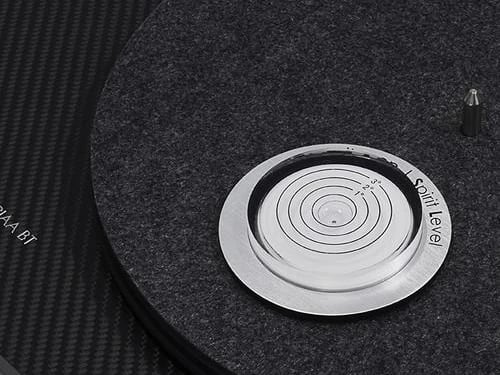
Check the stationary platter in two directions.
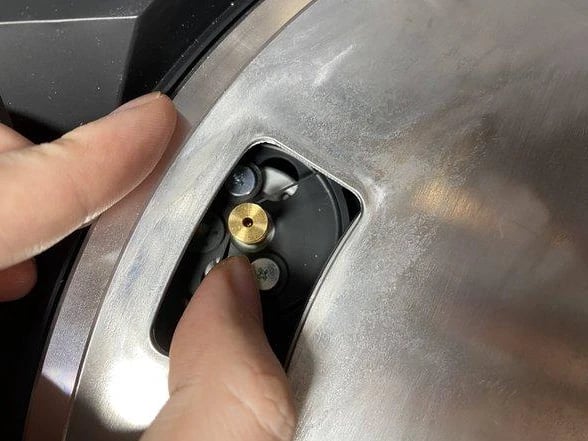
Check the belt’s path and seating.
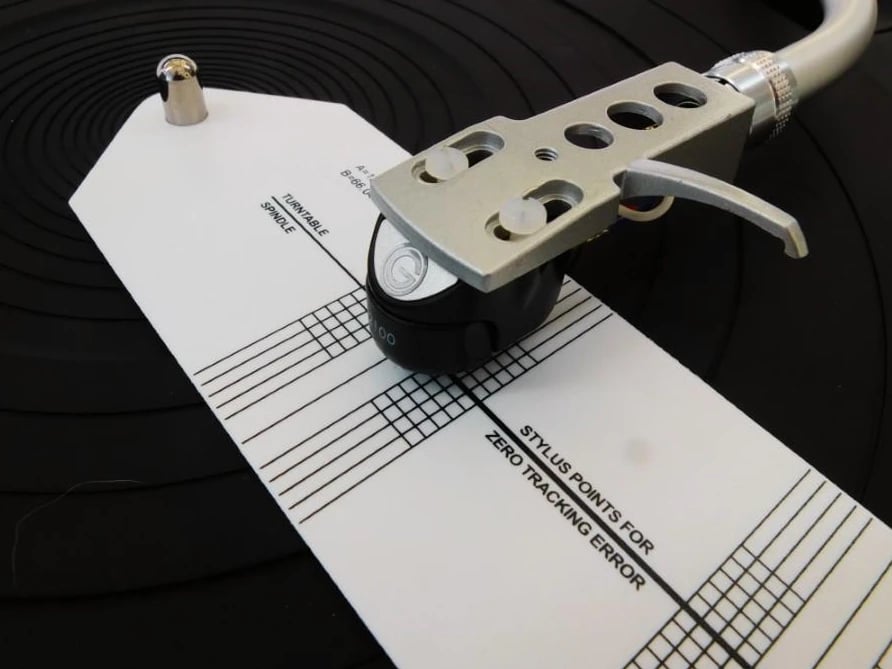
Check the stylus position against the protractor grid.
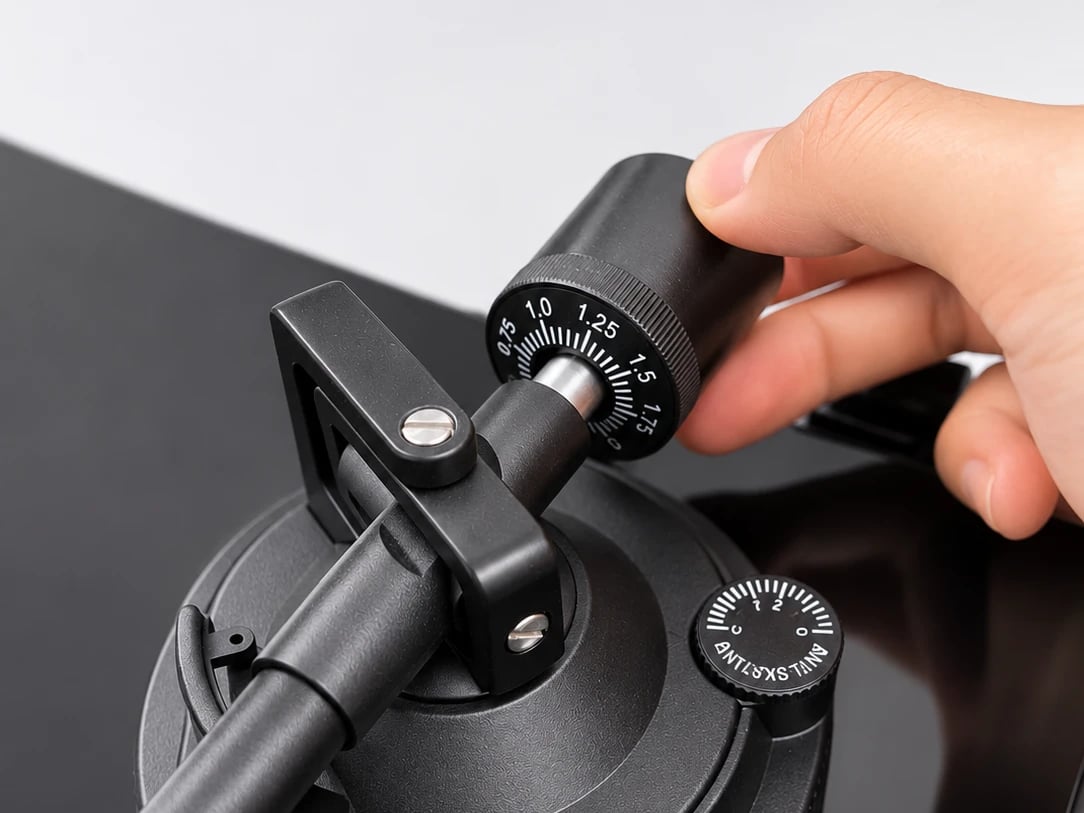
Float the arm as directed in the turntable manual.
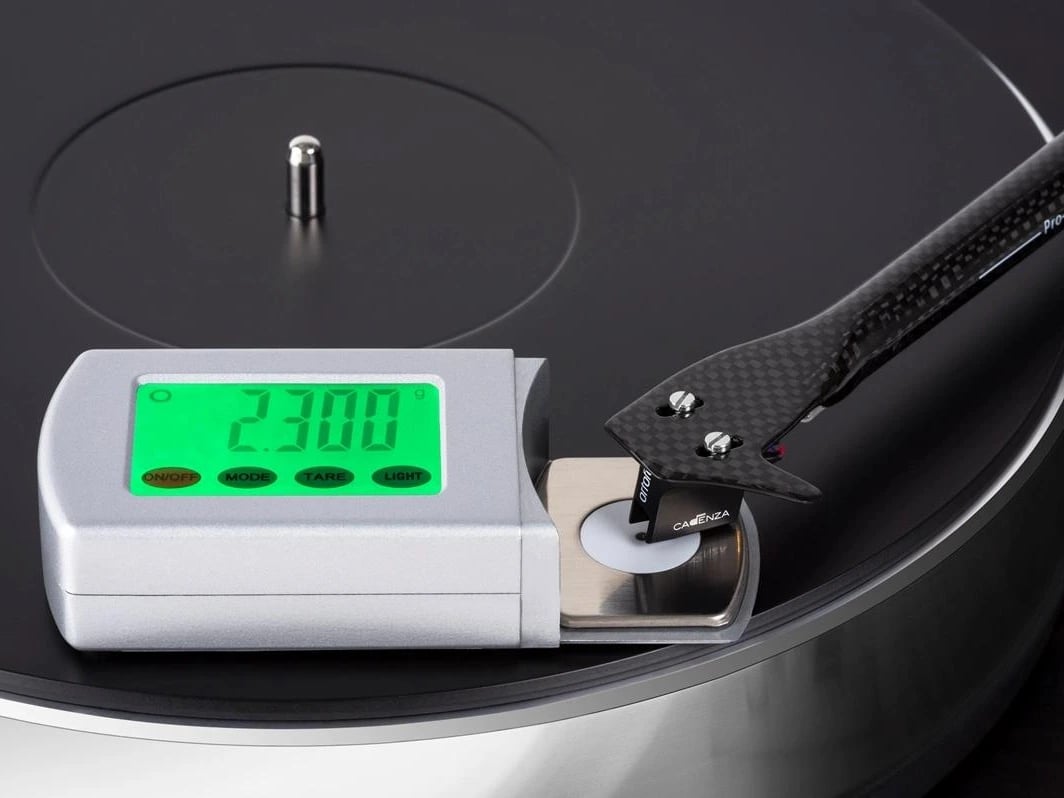
Verify the force against the cartridge maker’s range.
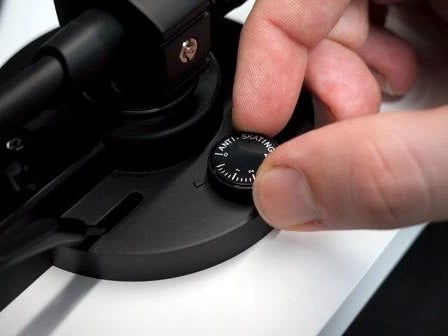
Find the anti-skating dial beside the tonearm pivot.
| Setup Item | Verification Method |
|---|---|
| Platter Level | Check the stationary platter with a spirit level left to right and front to back. |
| Drive Belt | Where applicable, check that the belt follows the specified path, lies flat and runs clear of nearby parts. |
| Cartridge Alignment | Where applicable, check the stylus position and cartridge angle against the tonearm’s specified protractor. |
| Tracking Force | Where applicable, measure at approximately record height and compare with the cartridge maker’s recommended range. |
| Anti-Skating | Where applicable, confirm the setting against the arm maker’s procedure at the chosen tracking force. |
| Playback Speed | Match the speed selector to the marking on the record. |
| Audio Output | Check that the output mode matches the selected input or Bluetooth device role. |
| Channel Balance | Use a known mono recording on a stereo system to check that both channels play at a similar level. |
| Playback Stability | Listen for steady pitch and clean tracking on a clean, familiar record. |
| Playback Problem | Possible Causes | Recommended Checks |
|---|---|---|
| Stylus Skipping | The record may be dirty or damaged, the support may be moving, or tracking force may be outside the recommended range. | Try a clean record, check support and platter level, then inspect the stylus and verify tracking force where adjustable. |
| Audible Distortion | A dirty stylus, alignment error, mistracking or input overload may contribute. | Try another record, inspect the stylus and check the output mode. Verify alignment and tracking force where adjustable. |
| Unstable Pitch | The speed setting, a warped or off-centre record, or a poorly seated belt may contribute. | Confirm the selected speed, try another record and check belt seating where applicable. |
| Uneven Channel Output | A recording, loose RCA connection, balance setting or cartridge setup may contribute. | Try a known mono record. Check RCA seating and amplifier balance before checking adjustable cartridge settings. |
| Electrical Hum | A missing ground connection, loose signal lead or interference from nearby mains equipment may contribute. | Check signal leads and the ground connection described in the manual. Route phono cables away from mains adapters. |
| Acoustic Feedback | Speaker output may be reaching the stylus through air or a shared surface. | Lower the playback volume, then check whether moving the turntable or speakers to separate supports reduces the problem. |
| Very Low Volume | A phono-level output may be feeding a line input, or the wrong input may be selected. | Verify input selection and match PHONO OUT to a compatible phono stage or LINE OUT to a line input. |
Frequently asked questions
- How does a turntable produce sound?
- The stylus follows the moving record groove and the cartridge turns that motion into an electrical signal. In a moving-magnet system, a phono preamplifier raises the cartridge signal to a usable level and applies playback equalisation. An amplifier then drives the speakers, whose diaphragms move air to produce sound.
- What is the difference between a turntable and a record player?
- In practice, the terms often overlap. A component turntable commonly connects to a separate audio system, while an all-in-one record player may include amplification and speakers in the same cabinet. Check the actual inputs, outputs and built-in equipment when deciding what else you need.
- Does a turntable need a phono preamp?
- A moving-magnet cartridge needs a compatible phono stage to supply gain and apply RIAA playback equalisation. The stage may be built into the turntable or amplifier, or supplied as a separate unit. A turntable set to LINE can feed an ordinary line input because the built-in phono stage has already processed the signal.
- What is the difference between belt drive and direct drive?
- A belt-drive turntable passes motor torque to the platter through a belt. A direct-drive turntable uses a motor on the platter axis. Belt condition and tension can affect a belt drive, while the motor and its control system are central to direct-drive performance. Compare measured performance under equivalent test conditions.
- What is the difference between a moving-magnet and ceramic cartridge?
- A moving-magnet cartridge induces voltage in coils as a magnet moves. A ceramic cartridge generates charge when the stylus stresses a piezoelectric element. Their output levels and electrical loading differ. A moving-magnet cartridge typically uses a phono stage, while ceramic cartridges are often paired with a high-impedance input and suitable compensation.
- What causes wow and flutter in a turntable?
- Wow and flutter come from short-term changes in playback speed. Belt slip, pulley eccentricity, uneven motor torque, bearing problems or an off-centre record can contribute. Mean speed may still be correct while the pitch wavers. Compare figures from measurements made with matching test conditions, weighting and detector type.
- How does tracking force affect record playback?
- Tracking force is the downward load at the stylus. Too little can cause mistracking and audible distortion, while too much can increase stylus and groove wear. Use the specification for the fitted cartridge and stylus. On an adjustable tonearm, verify the setting with a zeroed gauge near record playing height.
- What is the difference between PHONO and LINE output?
- In a typical moving-magnet system, PHONO OUT sends the low-level cartridge signal to a compatible phono stage. LINE OUT supplies audio after the turntable has added gain and playback equalisation. Match each output to its corresponding input. A line output feeding an active speaker works through the speaker’s own amplifier.
- Can a turntable connect to Bluetooth speakers or headphones?
- A turntable can send vinyl audio to Bluetooth speakers or headphones if it supports Bluetooth transmission (TX) and shares a compatible audio profile with the receiving device. A model with Bluetooth reception (RX) accepts audio from a source such as a phone. For wired turntables, a separate transmitter can take a compatible line-level signal.
- What determines the sound quality of a turntable?
- Playback quality depends on how the drive, tonearm, cartridge and electronics work together. Speed stability affects pitch, stylus condition and alignment affect tracking, and cartridge loading can shape frequency response. The condition of the record and the rest of the audio system also influence what reaches the listener.
- Why does a turntable need accurate speed control?
- The platter must turn at the speed for which the record was cut to reproduce the intended pitch and timing. A steady speed error shifts both. Short-term variation makes sustained notes waver. For historical 78s, check the recording’s intended speed and groove type before choosing a setting and stylus.
- How should a turntable be set up correctly?
- Start on a stable, level surface and follow the model’s instructions for any platter or belt assembly. If the tonearm is adjustable, verify cartridge alignment and tracking force. Select the record’s speed and match the output to the input. On factory-adjusted players, use the manufacturer’s preset settings unless the manual calls for an adjustment.
Conclusion
A turntable is a precision electromechanical system that converts microscopic variations in a record groove into an electrical audio signal. From platter rotation and stylus tracking to cartridge transduction, phono equalisation and amplification, each stage contributes to the final playback performance.
Accurate rotational speed, low mechanical vibration, correct cartridge alignment and appropriate tracking force are essential to reliable groove tracking and consistent sound reproduction. Drive mechanisms, cartridge technologies and audio output configurations also influence how a turntable performs and integrates with different audio systems.
From a manufacturing perspective, turntable quality depends not only on component selection but also on mechanical engineering, electrical design, assembly consistency and systematic performance testing.
Understanding these principles provides a practical foundation for evaluating turntable designs, selecting suitable configurations and achieving reliable vinyl playback.
References
- Audio-Technica. AT-LPW50BT User Manual. Accessed .
- TEAC. TN-280BT Owner’s Manual and AT3600L specifications. Accessed .
- Audio-Technica. ATN3600L replacement stylus specifications. Accessed .
- U.S. Patent Office. Transistor amplifier circuit for piezoelectric phonograph cartridge (US3446920A). Accessed .
- Texas Instruments. Keeping Up with the Expanding Demands of High-Performance Audio (AN-1651). Accessed .
- IEC. IEC 60386 · Method of measurement of speed fluctuations in sound recording and reproducing equipment. Accessed .
- Analogue Productions. The Ultimate Analogue Test LP · publisher’s test track notes. Accessed .
- Audio-Technica. AT-LP120XUSB Direct-Drive Turntable specifications. Accessed .
- Library of Congress. MARC 21 · Sound Recording Physical Description. Accessed .
- Library of Congress. Inside the Archival Box · The First Long-Playing Disc. Accessed .
- American Vinyl Co. How Much Time Can Fit on a 7-, 10-, or 12-inch Record?. Accessed .
- Library of Congress. Jascha Heifetz Acoustic Recordings · National Recording Preservation Board. Accessed .
- Library of Congress. Capturing Analog Sound for Digital Preservation. Accessed .
- Ortofon. 2M 78 Verso stylus specifications. Accessed .
- SST Brüggemann. Frequently Given Answers · Record cutting guidance. Accessed .
- Bluetooth SIG. Advanced Audio Distribution Profile (A2DP), version 1.4.1. Accessed .
- Bluetooth SIG. LE Audio. Accessed .
- Qualcomm. Qualcomm aptX FAQs. Accessed .
- Ortofon. Cartridge and headshell dimensions. Accessed .
- Ortofon. Cartridge setup and care FAQ. Accessed .
- Pro-Ject Audio Systems. Measure it E · Stylus balance user guide. Accessed .
About DEON AUDIO
DEON AUDIO develops and manufactures turntables and other audio products for international brands through OEM and ODM projects. Product development covers mechanical design, electronics integration, controls and cabinet construction. Manufacturing capabilities include tooling and mould making, injection moulding, surface finishing, printing and assembly. Specifications, functional checks and inspection criteria are agreed for each project and its intended market. The product range includes component turntables and integrated record players.
Discuss your turntable project
Share your playback, connectivity and cabinet requirements with DEON.